As a software engineer, I’ve always found side projects important. Not because of “hustle culture”, but because they’re usually the only place where you can experiment freely and actually learn new things.
This project combines two things I care about: backend systems and my home city, Alicante.
What is AlicanteAbout.com?
I created AlicanteAbout.com as a content website about Alicante: transport, beaches, festivals, practical guides, and what daily life in the city looks like.
The original idea was simple: write useful content, rank on Google, and generate traffic. For years I wrote all the articles myself, took the photos, and slowly grew the site. Over time, it became a fairly large content base.
Then AI happened.
People started searching less and asking AI tools more. Suddenly, having “good SEO content” didn’t feel like enough anymore.
I didn’t want users to leave my site to ask random AI models questions about Alicante. I wanted them to stay on the website and get answers based on the content I had already written, not on generic model knowledge.
That’s where the idea of building a grounded RAG chatbot came from.
What problem I wanted to solve
I wasn’t trying to build a fancy chatbot.
What I wanted was:
- fast answers to very concrete questions
- no hallucinations
- no made-up information
- clear links back to the original articles
Basically, to use AI as a better way to access existing content, not as a replacement for it.
Design goals and constraints
AI can be tricky to deploy consciously, so I set some clear constraints early on.
- All answers must be grounded in website content, not model training data.
- If the content doesn’t support an answer, the system should say “I don’t know”.
- Every answer should include sources.
- The solution must work with WordPress, since AlicanteAbout.com runs on WordPress.
- The corpus is relatively small, so I wanted to avoid unnecessary complexity.
- The chat must be fast, cost-efficient, and predictable.
- Abuse prevention and basic rate limiting are required.
- GDPR and privacy need to be taken seriously.
What I didn’t want to build
It was just as important to decide what not to do.
- Not a generic chatbot that “sounds smart”.
- Not a massive WordPress plugin doing everything.
- Not a vector database for a dataset that doesn’t need one (yet).
- Not a system that gives confident answers without being able to justify them.
If an answer can’t be traced back to content, I’d rather not answer at all.
High-level architecture
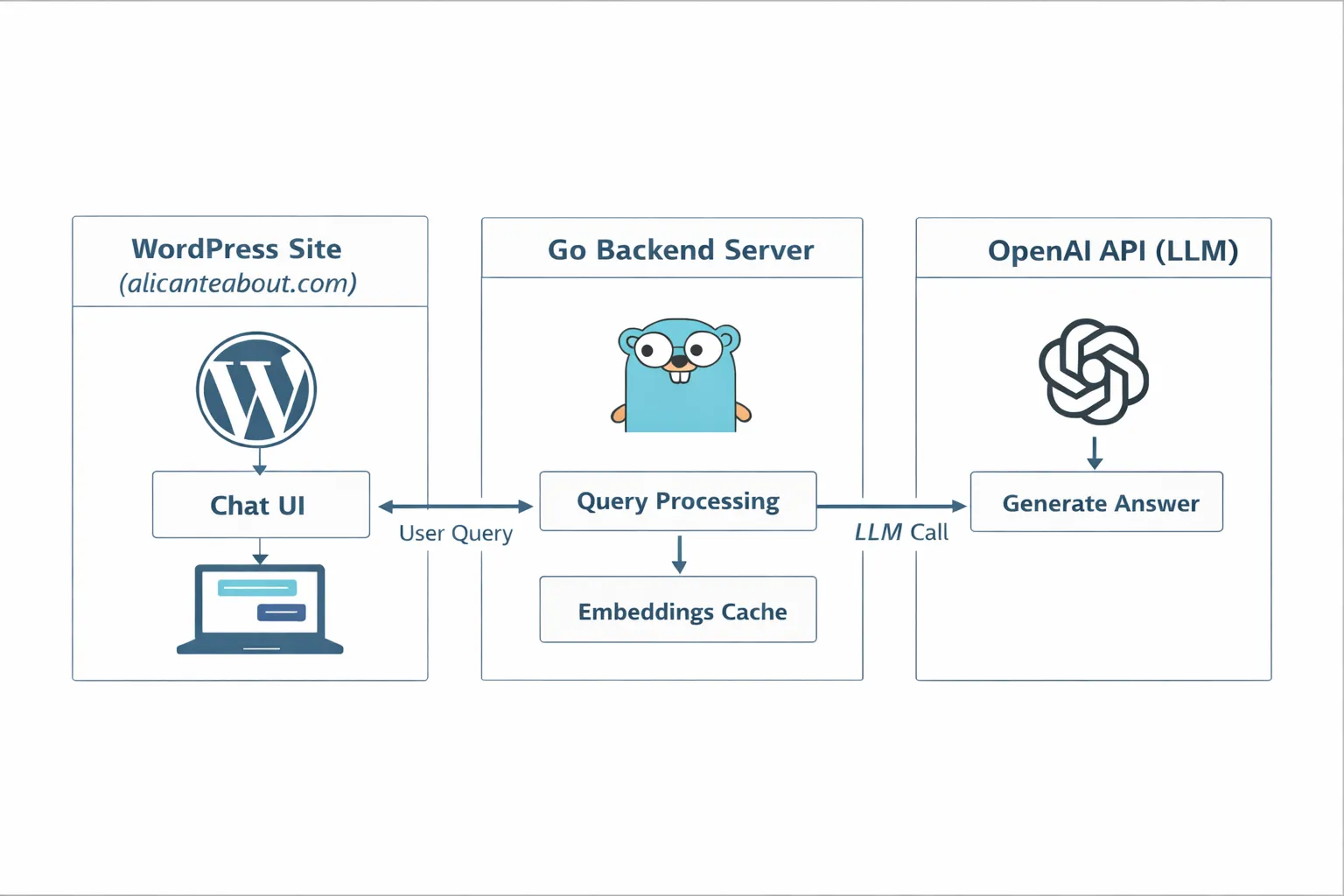
I designed this as a functional MVP, not as a startup product.
The system has three main components:
- An offline preparation phase to download, clean, and prepare content for AI consumption.
- A backend server written in Go that interacts with OpenAI APIs.
- A lightweight chat UI built specifically for WordPress.
For the MVP, I accepted some manual steps in the data preparation process. I built scripts to help, but avoided over-engineering too early.
I also chose Go for the backend because it’s the language I’ve been using for years and feel most comfortable with.
I evaluated third-party chat widgets, but rejected them. I wanted a lower-cost solution that I could fully control, especially around behavior, failures, and data flow.
How the offline preparation works
The goal of the offline pipeline is to do all the expensive work before any user asks a question.
Exporting content from WordPress
I use the WordPress REST API (/wp-json/wp/v2/posts and /wp-json/wp/v2/pages) to export all articles and pages, including URLs, titles, and raw HTML content.
This gives me offline access to the entire corpus.
Cleaning the data
The exported content is HTML, which isn’t useful for retrieval. Before saving it, I strip HTML tags, styles, and layout elements, keeping only clean, readable text.
Chunking and embeddings
Each article is split into smaller chunks that represent coherent pieces of information. Each chunk is then converted into an embedding, a numerical representation of its semantic meaning.
This step is done offline, once, before any user interaction.
Caching
Generating embeddings costs money and time, so all embeddings are cached to disk and loaded into memory at runtime.
For this project, a simple file-based cache is enough. A vector database would be overkill at this stage.
From a user question to an answer
When a user asks a question, the flow is:
- The question is embedded.
- Its embedding is compared against cached chunk embeddings.
- The top relevant chunks are selected.
- The LLM is asked to answer using only those chunks.
- The response is returned along with source links.
Only relevant chunks are sent to the model, not full articles. This keeps answers focused and verifiable.
Grounding, fallbacks, and saying “I don’t know”
Confidently wrong answers are worse than no answer.
The system is explicitly designed to refuse answering when the retrieved content isn’t relevant enough. In those cases, the correct behavior is to say “I don’t know based on the site content”.
This was a deliberate design choice.
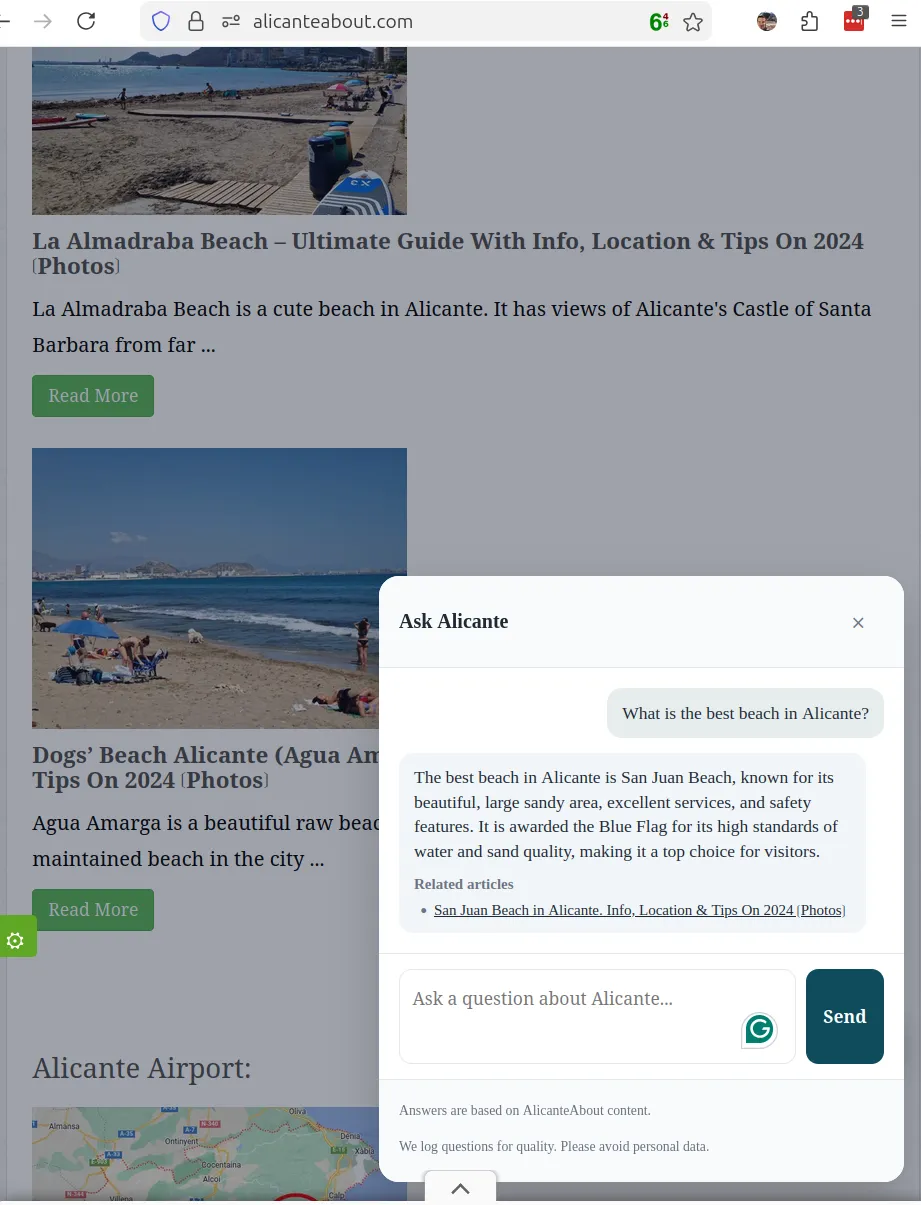
Here is a screenshot showcasing the Alicante About chatbot in action:
Observability
For me, a valid MVP also needs visibility into how users interact with it.
I log questions asynchronously into a Postgres database, after sanitizing them to avoid storing personal data. Users are also warned not to include personal information.
I store:
- the question
- a hash to detect repeated questions
- whether the system answered or refused
- returned sources
- relevance scores
- latency
This is enough to understand usage patterns and guide future improvements.
What I’d improve next
Some things I deliberately left out:
- smart handling of real-time data (e.g. tram schedules)
- multilingual support
- admin tooling
- fully automated content curation
- deeper analytics and feedback loops
A note on Agentic Programming
An additional goal of this project was to gain hands-on experience with agentic programming.
While AI tools can write code very quickly, they still need clear instructions and architectural guidance. This project reinforced the idea that AI can accelerate development, but doesn’t replace the need for solid engineering judgment.
Most of the value still comes from deciding what to build and what not to build.
Final Notes
I have published the MVP implementation of this project on GitHub as a reference. It contains the system as it is today. With all the trade-offs and constrains.
The chatbot you see when visiting AlicanteAbout.com might be different as I will iterating on it more privatelly.